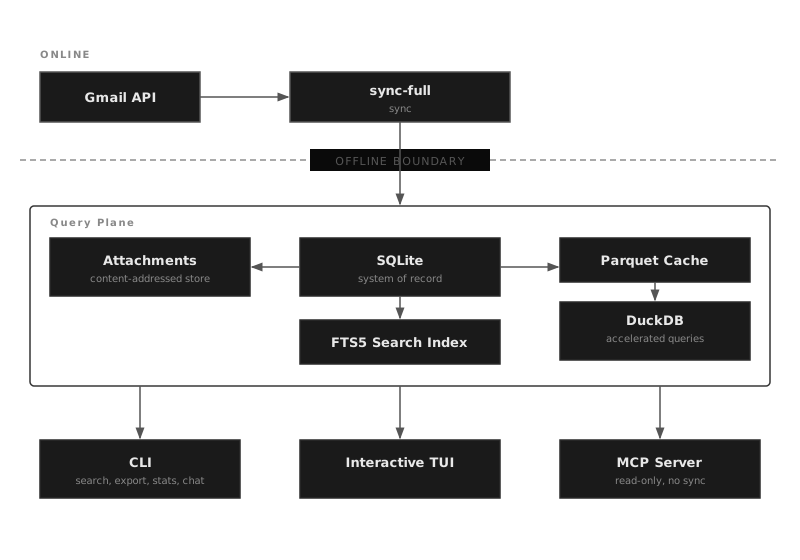
Your email and message data is yours. msgvault downloads a complete local copy of your email (from Gmail, IMAP, or local archives) and imports text messages from WhatsApp, iMessage, and Google Voice. Keyword search, analytics, the TUI, and the MCP server query local SQLite and Parquet files. Nothing contacts your live mailbox outside sync and deletion commands that you run explicitly. Optional vector search calls only the embedding endpoint you configure; use a local or self-hosted endpoint if message text must never leave your machine or network.
Years of PDFs, photos, documents, and spreadsheets buried in your inbox become ordinary files on your filesystem, deduplicated and instantly searchable. Your data is no longer locked behind a web interface or an API. It’s just files on disk that you own and control.
Features
Full Email Backup
Downloads complete messages from Gmail or any IMAP server, including raw MIME, labels, metadata, and every attachment. Every PDF, photo, spreadsheet, and document you’ve ever received or sent is extracted and stored locally, deduplicated by content hash.
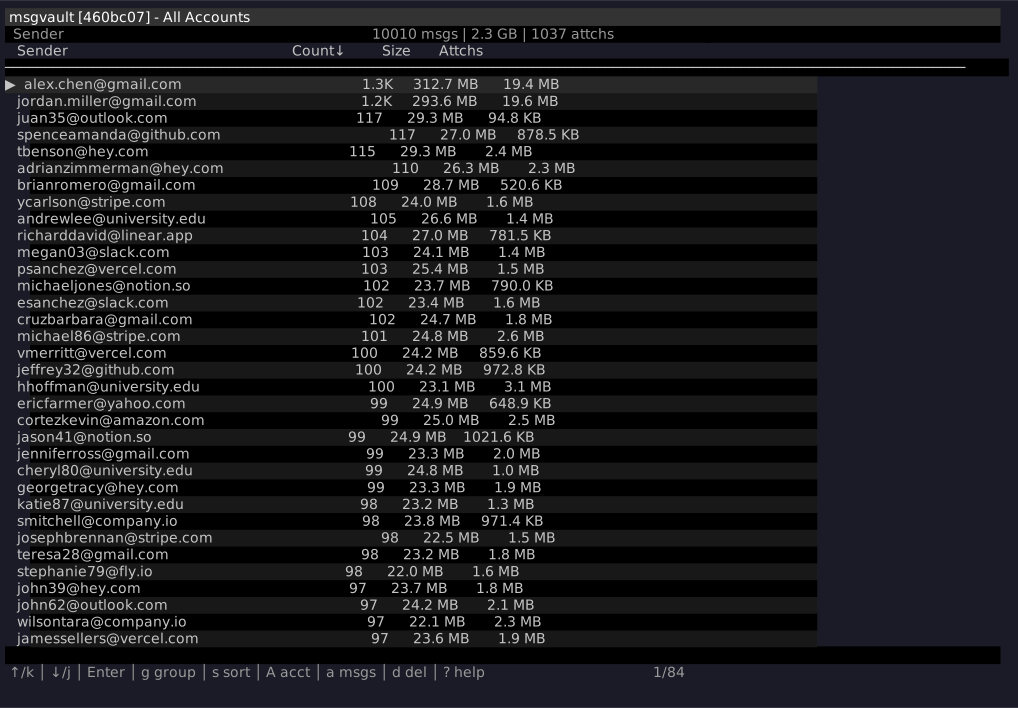
Lightning-Fast TUI
Explore hundreds of thousands of messages with instant aggregation and drill-down. Powered by DuckDB over Parquet, hundreds of times faster than SQL JOINs, in a small footprint.
Full-Text Search
SQLite FTS5-powered search with Gmail-like query syntax. Search by sender, date, label, size, attachments, and more.
Semantic & Hybrid Search
Opt-in semantic search with vectors stored locally, plus hybrid ranking that fuses BM25 and vector similarity via Reciprocal Rank Fusion. Point msgvault at a local or self-hosted OpenAI-compatible embedding endpoint and query by meaning, not just keywords. Exposed through local CLI search, the HTTP API, and MCP server.
Multi-Account
Archive multiple email accounts (Gmail and IMAP) in a single database with cross-account search.
Incremental Sync
Uses Gmail History API for efficient updates after initial full sync. Resumable checkpoints for interrupted syncs.
MCP Server
Expose your archive to AI assistants like Claude Desktop via the Model Context Protocol. Search, read, and analyze your messages from any MCP-compatible LLM.
Web Server
REST API for programmatic access to your archive. Optional cron-based background sync scheduling. Build dashboards, automations, and integrations.
Local Import
Import MBOX archives, Apple Mail .emlx exports, and text messages from WhatsApp, iMessage, and Google Voice. Messages are deduplicated, fully indexed, and searchable alongside your email data.
Safe Deletion
Stage messages for deletion in the TUI or via AI assistant, review manifests, then permanently delete from Gmail or IMAP provider.
 msgvault